Traveling To Oslo: ESIM, Data And Connectivity Guide
Norway is one of the easiest countries in Europe to stay connected in, and one of the most expensive to do badly. Here is what actually works.

Short answer
Norway has excellent 4G and 5G coverage, and most US and EU phones work out of the box. An eSIM bought before you fly, or a local physical SIM from a Norwegian operator, is usually far cheaper than roaming. Norway is in Schengen but not in the EU, so EU roaming caps do not apply here.
Norway runs one of the most connected societies on earth. Government services, train tickets, ferry timetables, museum bookings and even the saunas at Sørenga assume you carry a working smartphone, and Oslo assumes it hardest of all. The city's own bike-share system, the Ruter app that runs every tram, bus, metro and island ferry, and the QR-coded menus in half the restaurants on Grünerløkka all lean on data.
That cuts both ways. Get connectivity right and Oslo is one of the smoothest cities in Europe to move around in. Get it wrong and you are standing at Rådhusbrygge 3 trying to buy a ferry ticket from a machine that wants an app. The good news is that Norway's mobile networks are excellent, the coverage in Oslo is close to total, and the fix is usually a ten-minute job before you fly.
One framing fact before anything else, because it changes the whole calculation and most guides get it wrong: Norway is in the Schengen Area but is NOT a member of the European Union. It is an EEA/EFTA state, it uses the krone rather than the euro, and EU "roam like at home" rules do not bind Norwegian operators the way they bind EU ones. In practice many plans still include Norway, but you cannot assume it, and that assumption is where the bill shock comes from.
This guide from oslotravelguide.com covers the four ways to stay connected in Oslo, what each genuinely costs, where coverage actually reaches, and how the practical details of traveling to Oslo intersect with your phone: payment terminals, public Wi-Fi, the apps you will need on day one, and the offline fallbacks that save you when a tunnel on the Metro eats your signal for two minutes.
Do I Need A Special SIM Or ESIM For Oslo?
No, and that is the short answer, but the long answer saves real money. Norway uses the same GSM, 3G, 4G and 5G standards as Europe and most of the world, so any recent phone from the US, UK, EU or Asia will physically work on Norwegian networks. The question is not compatibility, it is price: roaming on a foreign plan in Norway can cost several dollars per day, while an eSIM or local SIM costs a fraction of that for the same data.
The compatibility check matters mostly for older US phones. Norway shut down its 3G networks years ago, so a phone that only supports 3G for voice is a paperweight here. Any recent iPhone, most modern Android flagships and anything sold as 5G-ready will be fine. If your phone supports eSIM, which most phones sold in the last few years do, you can install a Norwegian data plan before you leave home and land connected.
The decision really comes down to three honest options, and the right one depends on how long you are staying and how much data you use:
| Option | Best for | Rough cost | Setup effort |
|---|---|---|---|
| eSIM bought before flying | Trips under 2 weeks, anyone who wants to land connected | Varies by provider and package | 10 minutes at home |
| Local physical SIM in Oslo | Stays over 2 weeks, heavy data users | Varies by operator and package | Store visit, ID needed |
| Roaming on your home plan | Very short stays, plans that include Norway | Check your carrier's Norway rate | Zero |
The one thing not to do is arrive with no plan and "sort it later." Oslo Airport's free Wi-Fi is decent, but the moment you need the Ruter app to buy a train ticket into the city, having data already working is the difference between a smooth landing and a twenty-minute queue behind the escalators.
What Is The Cheapest Way To Get Data In Oslo?
For most visitors on trips of a week or two, a prepaid travel eSIM installed before departure is the cheapest and simplest route, typically costing far less per gigabyte than daily roaming charges from a US carrier. For stays of a month or longer, a physical prepaid SIM from a Norwegian operator usually wins on price, though it needs a store visit and photo ID. Roaming is only cheapest if your home plan already includes Norway at no extra charge.
The Norwegian market has three main network operators, Telenor, Telia and Ice, plus a stack of prepaid sub-brands running on those networks. Telenor is the incumbent and historically the strongest outside the cities; Telia runs a close second and is often the better value in prepaid; Ice is the budget network with slightly thinner rural coverage but perfectly good service in Oslo itself. Travel eSIM providers install onto whichever network they have agreements with, and in Norway that usually means Telenor or Telia.
A few practical notes that come from the operators' own published terms rather than from marketing pages:
- Physical prepaid SIMs in Norway require registration with photo ID, a rule that applies to everyone, resident or visitor. A passport at the point of sale is enough.
- Norwegian prepaid packages are sold as combinations of data, minutes and SMS, with generous data allowances by European standards.
- Top-ups are easiest in the operator's own app, which is also where you check your remaining balance.
- Travel eSIMs are data-only. If you need a Norwegian phone number for calls or SMS verification, you need a physical SIM; otherwise use messaging apps over data, which is what most visitors do.
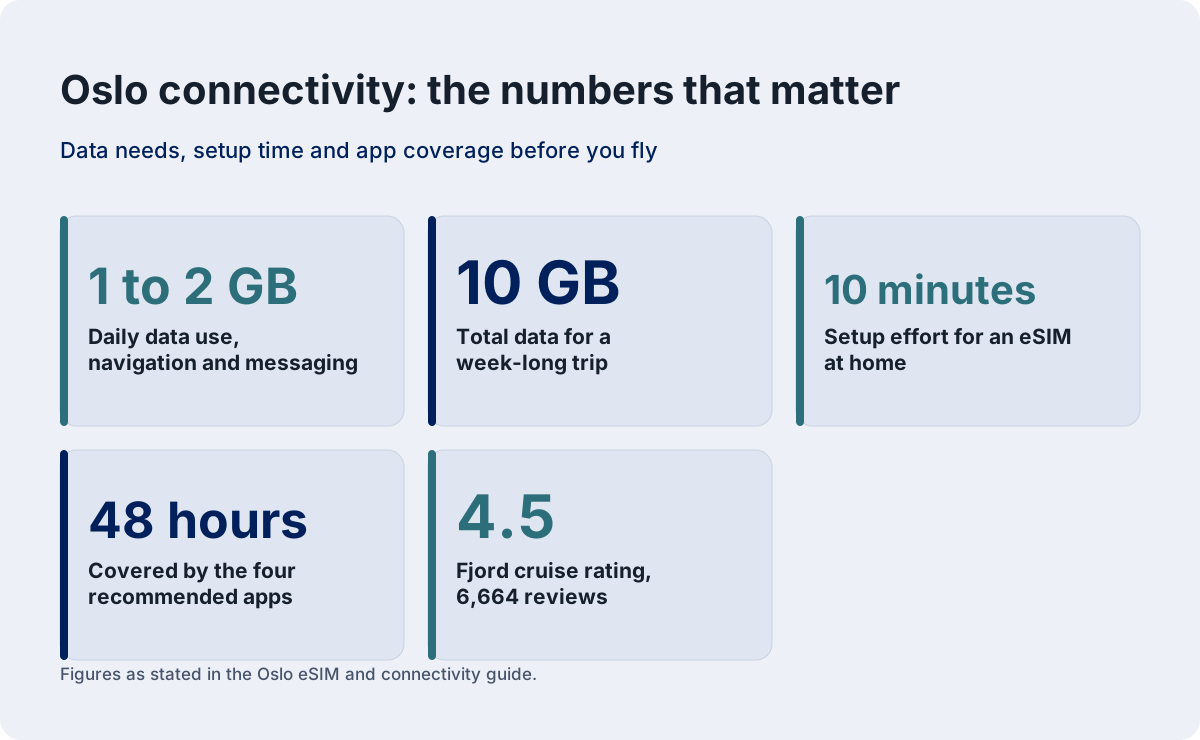
The comparison that matters is total cost for your whole stay, not cost per gigabyte. A traveler using 1 to 2 GB per day for navigation, tickets and messaging on a week-long trip needs roughly 10 GB total, and that is the number to price against your carrier's roaming rate before you commit to anything.

While you are sorting connectivity, it is worth locking in the parts of the trip that sell out. The three products below are the ones this site recommends most often to first-time visitors, and having your eSIM working before you land means your tickets are on your phone the moment the plane doors open.
The electric fjord cruise in that selection is worth a sentence of its own, because it doubles as the answer to "what do I do on my first evening." It is a 90-minute silent boat trip with an audio guide, it runs year-round, and the listing carries a rating of 4.5 across 6,664 reviews, which makes it the most-reviewed activity in the city. It needs no planning beyond a phone ticket, which is exactly why it pairs with a connectivity guide: everything about it, from booking to boarding, happens on your screen.
How Good Is Mobile Coverage In Oslo And Norway?
Coverage in Oslo is effectively total: 4G and 5G reach every street, tunnel, Metro line and fjord island, and the main operators' own coverage maps show near-unbroken signal across the entire capital region. Outside the cities, Norway still ranks among the best-covered countries in Europe for its population density, with strong signal along every main road, railway and coastal ferry route. The gaps are in the high mountains and deep valleys of the interior, exactly where you will be hiking, so download offline maps before any day trip.
That last point deserves emphasis because it is the one place visitors get caught. The train to Bergen, the Flåm Railway and the roads across the Hardangervidda all pass through long stretches of mountain with no signal at all, by design rather than neglect. If you are planning any of the classic Norwegian rail journeys, load your maps, tickets and entertainment onto the phone before you board. Our pages on the Oslo to Bergen train and the Flåm Railway cover what those journeys are actually like.
Within Oslo itself, the coverage question is close to trivial. The T-bane tunnels, including the long run under the city center, carry signal throughout. The ferries to Hovedøya, Gressholmen and Langøyene hold signal for most of the crossing, dropping out only mid-fjord on the outer islands. The Opera House roof, the top of the Holmenkollen ski jump and the trails around Sognsvann all have full service. If your phone shows no bars inside Oslo, the problem is your SIM, not the network.
One genuinely Norwegian wrinkle: the country's geography means coverage maps are honest but population-sparse. A map showing "full coverage" along a valley road means the road itself, not the hillsides above it. Hikers heading into Nordmarka, the forest that starts at the edge of the Metro, should treat anything beyond the main trails and lakes as potentially offline country, which is also just good practice in a forest the size of a small county.

Will My US Phone Work In Norway?
Yes, any recent US phone works in Norway. The country runs the same 4G LTE and 5G bands used across Europe, and every iPhone and mainstream Android sold in the last several years supports them. The two things to check are that your phone is carrier-unlocked, because a locked phone refuses foreign SIMs and eSIMs, and that it supports eSIM if you plan to install a data plan before you fly.
The unlocking point is the one that strands people. A phone still tied to a US carrier contract will accept a Norwegian eSIM in the settings menu and then refuse to activate it, usually with an unhelpful error. If you are on a payment plan or a carrier lease, check your unlock status in settings before you travel; US carriers are required to unlock paid-off phones on request, and the request takes a day or two, not weeks.
For Americans specifically, the roaming math is the part worth doing honestly. US carriers charge among the world's highest international roaming rates, and Norway is a full international destination for them, not a neighboring country. A daily roaming pass can easily cost more for a week than a travel eSIM costs for the whole trip's data. The exception is if your plan includes international roaming as a bundled benefit, in which case check whether Norway is on the included list, because "Europe" bundles sometimes mean the EU and Norway sits outside it.
Here is the practical checklist for a US traveler, in order:
| Check | Where | Why it matters |
|---|---|---|
| Carrier-unlock status | Phone settings or carrier app | Locked phones reject foreign eSIMs |
| eSIM support | Phone specs | Determines whether you can install before flying |
| Roaming rate for Norway | Carrier's site or app | The number to beat with an eSIM |
| Wi-Fi Calling | Phone settings | Lets you receive US calls and texts over data |
| Physical SIM slot | Phone hardware | Fallback if eSIM activation fails |
Wi-Fi Calling deserves a line of explanation, because it quietly solves the biggest worry Americans have: staying reachable on their US number. With Wi-Fi Calling enabled, your phone sends and receives calls and texts over any internet connection, including a travel eSIM's data, so your bank's verification codes and your family's calls arrive as normal. Without it, your US number goes to voicemail the moment you land unless you pay for roaming.

Is There Free Wi-Fi In Oslo?
Yes, quite a lot. Oslo Airport offers free Wi-Fi throughout the terminal, the Ruter public transport system provides free Wi-Fi on Metro trains and in stations, and most cafes, hotels, libraries and museums offer guest networks. The gaps are on the street and in the fjord, where public networks are sparse, so free Wi-Fi is a supplement to cellular data in Oslo, not a replacement for it.
The airport's network is the one that matters most on arrival day. It covers the whole terminal including the arrivals hall and the train platforms below, which means you can install your eSIM, download the Ruter app and buy your ticket into the city before you even find the escalator. That matters because the train is the right way in from Gardermoen, and our Oslo airport to city centre guide covers the full decision between Flytoget and the Vy train, a decision with a real price gap attached.
On the transport network, the free Wi-Fi on the T-bane is good enough for messaging and email but not for streaming, and it drops in and out in tunnels. Cafes in Grünerløkka and around Majorstuen almost all have guest Wi-Fi, usually with the password printed on the receipt or the wall. Hotels range from excellent to adequate, with the newer properties, including the large ones opened recently in the center, offering fast connections as a selling point. Everything else covered here is indexed on Oslo Travel Guide. Everything else covered here is indexed on Oslo Travel Guide.
What free Wi-Fi will not do is carry a day of navigation, ticket-buying and translation. The pattern in Oslo is that connectivity is needed in motion: standing at a tram stop checking the next departure, scanning a QR code at a museum door, pulling up a booking confirmation at a tour meeting point. Those moments have no Wi-Fi, and they are the moments an eSIM exists for.

Which Apps Should I Install Before I Fly To Oslo?
Install four before departure: the Ruter app for all public transport including the island ferries, your bank's app with card notifications enabled, a mapping app with offline Norwegian maps downloaded, and the ticket or wallet app holding your tour confirmations. Everything else can wait, but those four cover the first 48 hours, and doing them at home on fast Wi-Fi beats doing them on airport Wi-Fi at midnight.
Ruter is the big one. It is the app that sells and validates every tram, bus, Metro and ferry ticket in the city, and it is also the journey planner that tells you which platform and which line. It is worth reading our Ruter tickets guide before you arrive, because the zone system has a genuinely useful quirk: the entire Metro network sits in zone 1, and a single zone 1 ticket is valid for 60 minutes from activation. The app is also where you buy the ticket that covers the airport run on the Vy train, which is the cheap way in from Gardermoen.
Beyond those four, a shortlist worth considering:
| App | What it does in Oslo | Install before flying? |
|---|---|---|
| Ruter | All public transport tickets and journey planning | Yes |
| Entur or Vy | National train times and tickets | Yes, if doing day trips |
| Weather (yr.no app) | The Norwegian forecast, better than global apps here | Yes |
| Translation | Norwegian menus and signs | Optional, English is near-universal |
| Your bank's app | Card controls and fraud alerts abroad | Yes |
The yr.no app deserves a mention because it is MET Norway's own forecast service, and Norwegians treat it as the national weather authority. Oslo's weather changes fast, the fjord makes microclimates, and the difference between the global apps' guess and yr.no's forecast is often the difference between a dry walk to Vigeland Park and a soaked one. It is free, in English, and it works offline for the last downloaded forecast.
On the subject of English: Norway consistently ranks at the top of global English-proficiency indices, and Oslo is the most English-fluent city in the country. Menus, signs, museum labels and transport announcements are bilingual or English-first in the tourist areas. You will not need a translation app for survival, though one is handy for the occasional monolingual menu in a neighborhood restaurant.
Do I Need Cash Or A Norwegian Bank For Apps To Work?
No. Oslo is one of the most cashless cities in Europe, and every app, ticket machine, taxi, cafe and market stall accepts contactless card payment from foreign cards. You do not need a Norwegian bank account, a Norwegian phone number, or any local financial setup to use Ruter, buy museum tickets or pay for anything else. A contactless credit or debit card, plus your home banking app, is the complete financial toolkit.
The card situation has one wrinkle worth knowing: Norway moved early and hard to BankAxept, the domestic debit scheme, and some older terminals historically preferred it. That era is over for visitors; every terminal in Oslo now takes international Visa and Mastercard contactless without comment. American Express works in most places but not all, particularly smaller food stalls, so carry a Visa or Mastercard as the primary.
Cash, for completeness, is close to dead. Some Norwegians go months without touching a krone note. ATMs exist, marked "Minibank," and are easy to find in the center, but the reasons to withdraw cash are close to zero: no market, no laundromat, no street food stall in this city requires it. Our Oslo currency and cash guide covers the details, including the tax-refund angle for non-EU visitors, which follows from Norway's position outside the EU customs union.
The one genuine number-related need is SMS verification. Some services, including a few banks and some app signups, send codes by text to your home number, which is another reason to enable Wi-Fi Calling before you fly rather than after it fails. A travel eSIM with a data-only plan does not receive those texts; your home SIM, roaming or Wi-Fi Calling, does. Keep the home SIM active in its slot or eSIM profile even when you are running everything on the travel plan.

What About Data On The Fjord And The Islands?
In the inner Oslofjord, coverage holds almost everywhere: the ferries to Hovedøya, Gressholmen and Langøyene stay connected for most of their crossings, and the islands themselves have full 4G. Further out, on the longer cruise routes and around the Bygdøy peninsula's western shore, signal drops for stretches, so download anything you need before boarding. The electric sightseeing boats stay in coverage almost throughout their route.
The island ferries are the case worth planning for, because they are a Ruter service and your ticket lives in the Ruter app on your phone. In practice this is a non-problem: the B1 line to Hovedøya takes minutes, the islands have signal, and the app validates tickets offline once they are bought. The failure mode is deciding to buy a ticket mid-crossing with no signal and no Wi-Fi, which is avoidable by simply purchasing before you board at Aker Brygge. Our Oslo ferries guide covers the routes, including the distinction between the Ruter island ferries and the separately ticketed Bygdøy museum ferry, which is a difference that catches visitors every summer.
For the sightseeing boats, the practical advice is simpler. The cruises are short, the commentary is either live or through a provided audio system, and the fjord scenery is the point of the hour. A phone with a full battery matters more than a phone with full bars, and cold spring evenings on the water drain batteries fast, so carry a power bank if you plan to photograph the whole trip. Our Oslofjord cruise guide covers which boat suits which kind of visit.
If you are building your first evening around that cruise, the booking, the ticket and the meeting-point directions all live on your phone, which brings the whole connectivity question full circle: the eSIM is not an abstract cost, it is the thing that makes the fjord trip, the museum ticket and the food walk all frictionless. Install it at home, test it on Wi-Fi, and Oslo's entire visitor infrastructure opens on arrival.
How Much Data Do I Actually Need Per Day In Oslo?
For a typical visitor day of navigation, messaging, ticket apps and social media, budget under a gigabyte per day. A day with heavy photo uploading, video calls or streaming on the Metro can push toward a couple of gigabytes. A week in Oslo using maps, Ruter, messaging and browsing therefore needs roughly 5 to 10 GB, and that is the package size to price when comparing eSIM options.
The surprising part is how little Oslo demands. The city's apps are lightweight, maps of a compact capital cache quickly, and the moments that eat data elsewhere, streaming on long transit rides, are short here: the Metro crosses the center in minutes. The heavy consumers are the ones you control: uploading photos in full resolution, video calls home, and music streaming on the walk to Frogner Park.
A realistic daily breakdown for a connected visitor:
| Activity | Approximate data use | Notes |
|---|---|---|
| Map navigation | Very low | Caches heavily after first load |
| Messaging apps | Low | Text-light, photo-heavy |
| Web browsing | Moderate | Museum sites, opening hours |
| Music streaming | Moderate | Standard quality |
| Video streaming | Very high | The budget killer |
| Photo upload | A few MB per photo | Full-resolution to cloud |
Two habits stretch any package a long way. First, download offline maps for Oslo and any day-trip destination before you leave home or the hotel Wi-Fi; navigation then costs almost nothing. Second, leave photo uploads and backups for hotel Wi-Fi overnight, which is where the gigabytes belong. With those two habits, even a modest 5 GB package comfortably covers a week.
Battery deserves the last word, because data is useless with a dead phone. Winter days in Oslo are cold, and cold drains lithium batteries dramatically; a phone that lasts all day in summer can die by mid-afternoon on a January walking tour, especially if it is running navigation constantly. Carry a power bank from November through March, keep the phone in an inside pocket rather than an outer one, and enable low-power mode for the long twilight walks rather than waiting for the 15 percent warning.

Any Final Connectivity Tips For Traveling To Oslo?
Install your eSIM and offline maps at home, enable Wi-Fi Calling on your home number, download the Ruter and yr.no apps, and carry a power bank in winter. Those four steps, done in twenty minutes before departure, cover essentially every connectivity problem a visitor to Oslo actually encounters. The rest, the coverage, the contactless payments, the near-universal English, is already solved by the country itself.
Norway's position outside the EU but inside Schengen is the one structural fact to keep straight, and it runs through more than phone plans: it is why EU roaming caps are not guaranteed, why duty-free allowances apply on arrival from EU countries, and why tax-free shopping refunds work for visitors. It never creates a problem, it just means you check rather than assume.
The city you land in rewards preparation lightly. Oslo is compact, walkable in the center, signposted in English, and equipped with a public transport system that works flawlessly through a single app. The connectivity decisions are all made in the first hour, at home, before the trip even starts. After that, the phone fades into the background and the fjord takes over.
For the parts of the trip worth booking ahead, the same three products remain this site's standing recommendations for a first visit, and every one of them is a phone-ticket experience that your freshly installed data plan will handle without a hitch.

Common Questions About ESIMs And Data In Oslo
Do I need a special SIM or eSIM for Oslo?
No. Norway uses the same 4G and 5G standards as Europe and most of the world, so recent phones work out of the box. The real question is price: an eSIM or local prepaid SIM is usually far cheaper than roaming on a foreign plan.
Will my US phone work in Norway?
Yes, provided it is carrier-unlocked. Check your unlock status before flying, because a locked phone will refuse a Norwegian eSIM even though the settings menu lets you install it.
Is there free Wi-Fi in Oslo?
Yes. Oslo Airport has free Wi-Fi throughout, the Metro offers it on trains and in stations, and most cafes, hotels and museums have guest networks. It is a supplement to cellular data, not a replacement.
Do EU roaming rules apply in Norway?
Not automatically. Norway is in the Schengen Area but not in the EU, so the EU's roam-like-at-home rules do not bind Norwegian operators. Many European plans still include Norway, but check yours rather than assuming.
How much data do I need per day in Oslo?
Budget under a gigabyte for a typical day of navigation, messaging and ticket apps, up to a couple of gigabytes with heavy photo or video use. A week needs roughly 5 to 10 GB.
Can I use contactless cards everywhere in Oslo?
Yes. Oslo is one of the most cashless cities in Europe and every terminal accepts international Visa and Mastercard contactless. Carry a Visa or Mastercard as your primary card rather than American Express.